Design your page
Workshop Assets
Use, fork and publish backgrounds, cursors, icons, themes and full looks in Workshop.
Workshop is the community library — backgrounds, banners, avatars, cursors, icons, badges, fonts, themes, effects, music and complete profile looks made by other users.
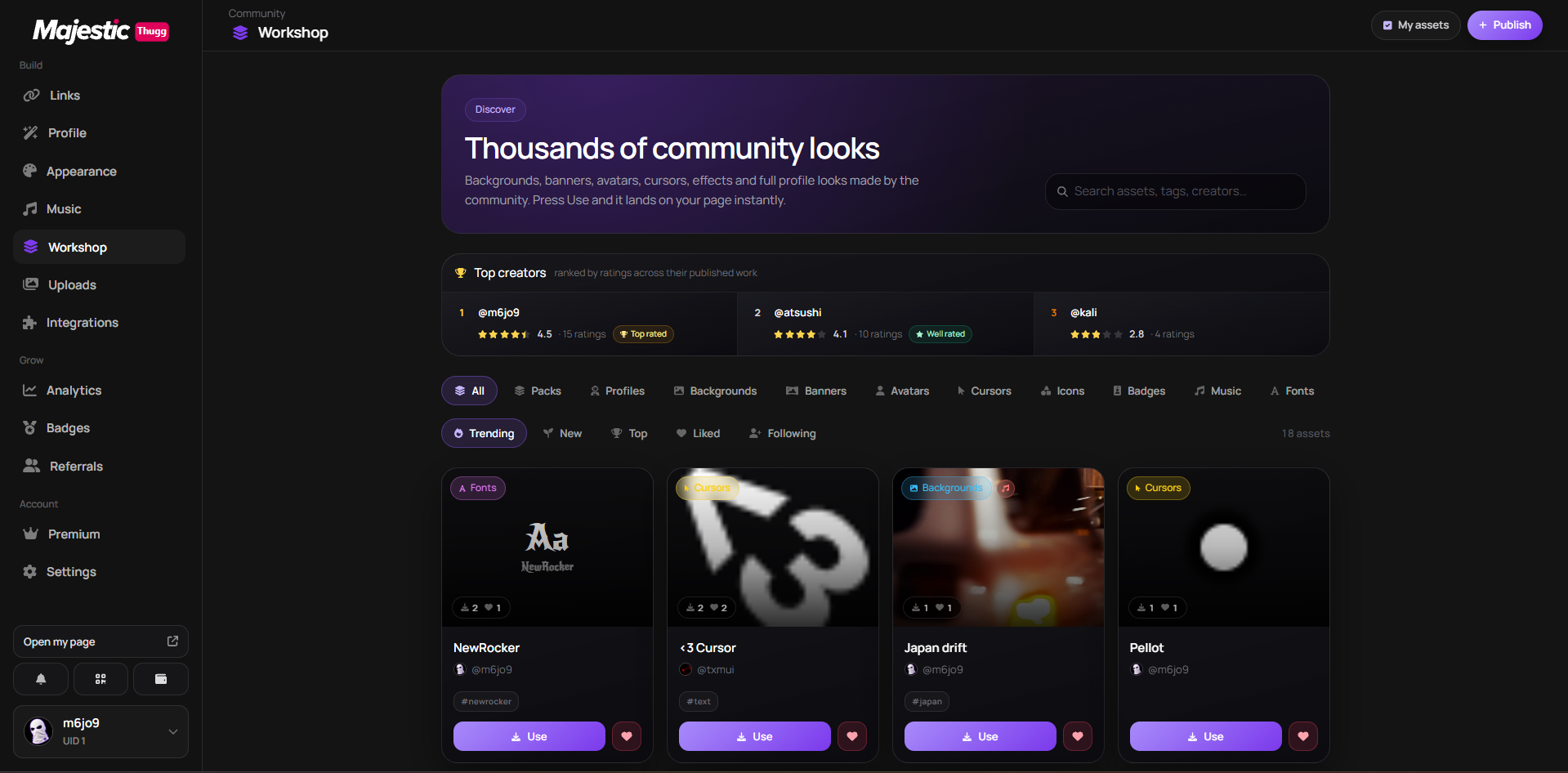
Browsing
- Filter by category, and switch between Trending, Featured, New, Top, Staff Picks and Following.
- The Packs tab sits in the same row of categories — community packs appear right beside single assets.
- Every tag on a card is clickable, and #tag links carry into the URL so you can share a filtered view.
- Press Use to apply an asset to your page instantly.
- Like assets to save them and support their author.
Forking
Fork an asset to build your own version. The original stays credited, so you can remix without erasing whoever made it.
Packs
A pack changes several parts of your profile at once — background, colors, cursor and effects together. Applying one is a single click.
Browse them from the Packs tab in Workshop, or open the Packs page to build your own out of assets you have already published.
Full looks & templates
A full look — sometimes called a template — sets background, colors, effects, cursor and layout in one move, so an empty page becomes a finished one in a single click.
- Open Workshop and switch to profile looks or packs.
- Preview one you like.
- Press Use — your profile updates instantly, and everything stays editable afterwards.
Your links, badges, analytics and username are never touched, and Premium-only pieces are skipped while your Premium is off. Happy with your own look? Publish it and keep the credit on every fork.
Custom fonts
- Upload a WOFF2, WOFF, TTF or OTF file and give it a name.
- The publish screen renders a live specimen so you see the real letterforms before it goes out.
- Font cards in the feed are drawn in the font itself — no thumbnail to prepare.
How much you can publish
Every plan has a cap, and it counts each category on its own — 30 backgrounds and 30 cursors both fit on a free account.
Assets per category
- Free
- 30.
- Premium
- 60.
- Creator
- 120.
Packs follow the same ladder, counted as their own category. Deleting something in My assets frees a slot immediately.
Publishing your own
- Publish from Workshop — the cap depends on your plan, see above.
- Some assets are Premium-only; Premium-only effects are skipped for visitors without Premium.
- Badge assets need a custom badge slot.
Your data is never copied
Assets never carry SEO settings, badges or view counts — only the look of a page.
This did not solve it?
Open a ticket with Workshop Assets already attached, or ask in Discord where someone is usually awake.